
Detect & Fix Screen Load Delays in iOS Apps
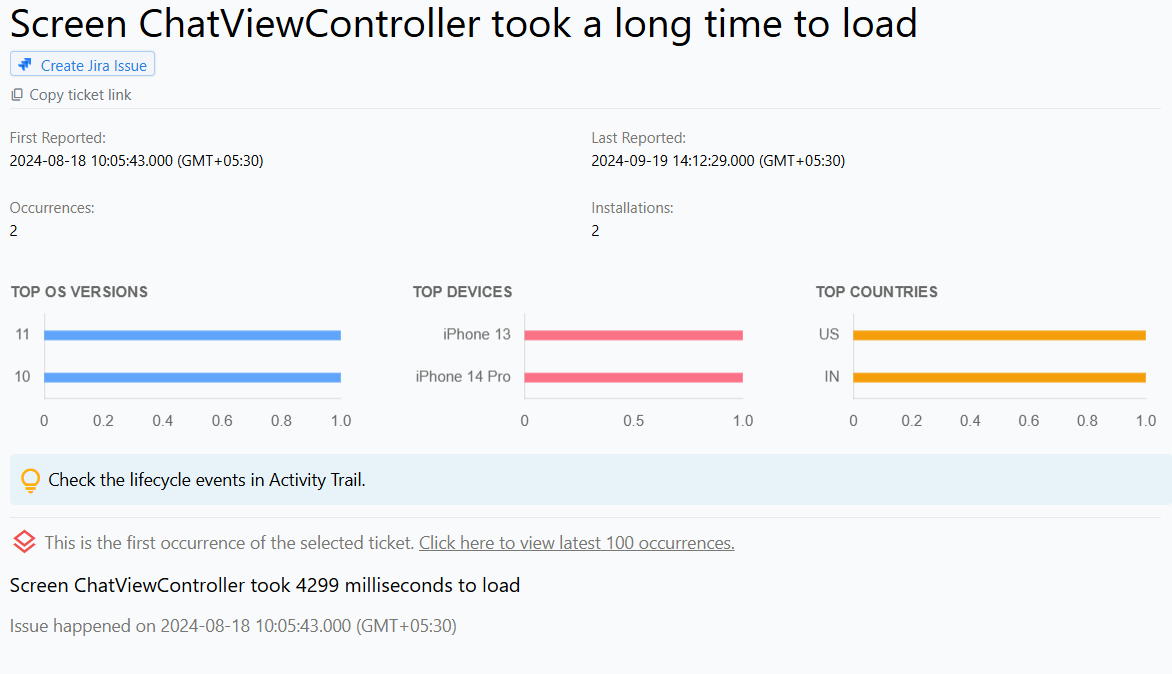
Screen Loading Delays in iOS and iPadOS apps
Screen loading delay is a common issue in iOS and iPadOS apps that can negatively impact user experience. Screen load delay refers to a non-ideal amount of time it takes for a screen to load after a user has requested it.
This can result in users experiencing unresponsiveness or sluggishness while navigating through the app. In some cases, screen loading delays can lead to users abandoning the app due to frustration or perceiving it as poorly designed or developed.
Why does this happen?
Screen loading delays in iOS and iPadOS apps can be caused by several reasons, such as:
Large Image Files: These files can slow down the screen load time as they require more time to be loaded and rendered. To solve this issue, you can use compressed images or optimize the images before using them in your app.
Complex Layouts: The use of complex layouts in the app can increase the time it takes to render the screen, thus slowing down the overall load time. You can optimize your layouts by using more efficient layout structures like RelativeLayout or ConstraintLayout, which are designed to handle complex layouts more efficiently.
Heavy Processing: If your app performs heavy processing tasks or computations during the screen loading process, it can slow down the screen load time. To address this issue, you can optimize the processing tasks to make them more efficient and use multi-threading techniques to speed up the process, ensuring a smoother and more responsive user experience.
How to fix it using Appxiom
- Locate issue report: The issue report will contain the name of the activity, along with data points such as the activity trail, which is a chronologically ordered list of events that occurred prior to the issue. This trail shows the point where the delay occurred.
- Trace activity trail: Setting custom activity trail markers will provide more granularity to the activity trail, making it easier and faster to identify the root cause of the problem.
Stop guessing. Start fixing.
Get real-time alerts, exact stack traces, and complete activity trails before these issues impact your revenue.
We use cookies to improve your experience.