A Practical Checklist for Writing iOS Framework Documentation Developers Will Actually Use

If you've ever integrated a third-party iOS framework, you already know this truth: great code means nothing if the documentation is confusing.
An iOS framework exists to make another developer's life easier. But without clear documentation, even the most powerful framework feels hard to adopt, risky to use, and easy to abandon. Documentation isn't an afterthought - it's the bridge between your framework and its users.
Think of your documentation as a guided walkthrough. When done right, it answers questions before they're asked and removes friction at every step. Let's walk through how to build documentation that developers trust, understand, and keep coming back to.
Where Should You Host Your iOS Framework Documentation?
Before writing a single word, you need to decide where your documentation lives. This choice affects discoverability, maintenance, and long-term scalability.
Option 1: Building a Documentation Website from Scratch
Creating your own documentation site gives you complete control over layout, navigation, and branding. You can design the experience exactly the way you want.
The downside? It's time-intensive. You'll spend significant effort not just writing content, but maintaining the site, updating styles, and managing structure as your framework grows. For smaller teams or fast-moving projects, this can quickly become a burden.
Option 2: Using a Documentation Website Generator
For most frameworks, documentation generators are the smarter choice.
Tools like GitHub Pages, Docusaurus, or similar platforms let you focus on content instead of infrastructure. They come with ready-made themes, search, versioning, and navigation - everything documentation needs.
One important recommendation:
Choose a tool that uses Markdown language. Markdown-based docs are portable, easy to maintain, and simple to migrate if you ever switch platforms.
Your First Page Matters More Than You Think
The first page, often a README or landing page is usually the first thing developers see. Treat it like a handshake.
At a minimum, this page should clearly answer:
What does this framework do?
Assume the reader landed here from a search result, not your website.
What do I need before using it?
Mention minimum iOS versions, Swift versions, and any dependency managers like CocoaPods or Swift Package Manager.
How do I install it?
Step-by-step instructions, copied directly into the terminal or Xcode, save developers time and frustration.
How do I use it - right now?
A simple "hello world" example goes a long way. If an API needs to be implemented, show it with real code snippets.
Good documentation doesn't explain everything on the first page - but it gives developers enough confidence to continue.
Keeping Documentation in Sync with Framework Versions
As your framework grows, your documentation has to grow with it. Nothing frustrates developers more than following instructions that no longer match the version they're using.
This is where version control becomes your safety net. Using Git for documentation lets you track changes over time, roll back when something breaks, and collaborate with other developers without stepping on each other's work. Tagging documentation alongside framework releases is especially useful - it ensures that every version of your framework has the right set of instructions to go with it.
When a developer checks out version 2.1, they should never have to guess whether the documentation applies to 1.8 or 3.0. Good versioning removes that doubt entirely.
Managing Versions in Your Documentation
As your framework grows, your documentation needs to grow with it. Versioning helps developers understand what changed, when it changed, and how risky an upgrade might be.
Use Version Control for Your Docs
Keep your documentation in the same Git repository (or a linked one) as your framework.
This allows you to:
- Track changes
- Review history
- Roll back mistakes when needed
- Use Git tags to tie specific documentation versions to framework releases
It also makes collaboration easier when multiple people are updating docs.
Follow Semantic Versioning (SemVer)
Semantic Versioning makes updates predictable. A version number looks like this:
MAJOR.MINOR.PATCH (for example: 2.1.4)
Most documentation generators like Docusaurus and GitHub Pages support this structure out of the box.
What Each Version Number Means
Major version
- Use this when you introduce breaking changes
- Examples: API changes that require code updates, removed features, or major redesigns
Minor version
- Use this when adding new features or enhancements
- Everything should remain backward-compatible
Patch version
- Use this for bug fixes, performance improvements, or small documentation updates
- These should be safe and easy to upgrade
Best Practices for Versioning
- Start with 1.0.0 for your first stable release
- Increase the major version only when:
- Backward compatibility is broken
- Large parts of the framework are rewritten
- Core functionality changes significantly
- Increase the minor version when:
- New features are added without breaking existing code
- Existing features are improved
- Increase the patch version when:
- Bugs are fixed
- Performance is improved
- Documentation is corrected or clarified
- Always include a changelog explaining what changed
- Use pre-release labels like beta or rc before a stable release to set expectations
- Stick to the same versioning rules every time - consistency builds developer trust
Write Release Notes Developers Can Act On
Release notes are not marketing copy. They're instructions.
Each release should clearly mention:
- What's new
- What changed
- What broke
- What developers need to do next
If there's an API change, explain how to migrate. If something breaks backward compatibility, highlight it clearly. The more predictable your updates feel, the more confident developers will be when upgrading.
Deprecating an API (Without Breaking Developer Trust)
As your iOS framework evolves, some APIs naturally outlive their usefulness. Deprecating them is unavoidable - but how you do it makes all the difference. A well-handled deprecation helps developers move forward confidently instead of feeling caught off guard.
Step 1: Announce the Deprecation Clearly
Start by being explicit and transparent.
- Clearly call out which API is being deprecated, including its current version
- Explain what the API does, along with its parameters and return values, so there's no confusion
- Set a clear timeline for when the API will be removed
- For major or widely used APIs, a window of 6 months or more is usually fair
- Smaller or less-used APIs can have shorter timelines
- Communicate this through official channels like your documentation and release notes so developers don't miss it
Step 2: Help Developers Migrate
Deprecation shouldn't feel like a dead end. Always show a way forward.
- Recommend alternative APIs that replace the deprecated functionality
- Provide migration guides with code examples and explanations to make switching easy
- If possible, offer bridge or compatibility APIs that work with both old and new implementations. This lets teams migrate gradually instead of all at once
- Add in-code warnings so developers get immediate feedback when using deprecated APIs:
- In Swift, use
@available(*, deprecated) - In Objective-C, use
__deprecated
- In Swift, use
These warnings act as gentle nudges rather than surprises.
Step 3: Sunset the API
Once the deprecation period ends:
- Remove the deprecated API from your framework codebase
- Clearly document the removal in your changelog and release notes so teams know exactly what changed
One Thing to Remember
Deprecation isn't a single action - it's a process. When done thoughtfully, it builds trust, reduces frustration, and helps your framework evolve without leaving developers behind.
Handled well, deprecation becomes a sign of maturity - not instability.
Make Your Documentation Easy to Find (SEO Matters)
Great documentation doesn't help if no one can find it.
Basic SEO goes a long way:
- Use titles and headings developers actually search for
- Write clear meta descriptions
- Link related pages internally
- Ensure fast loading and mobile responsiveness
- Always use HTTPS
Promote your docs where developers already hang out - communities, forums, GitHub discussions, and social platforms. Track performance using analytics tools so you know what's working.
Documentation Is Never "Done"
The best documentation evolves alongside the framework.
Collect feedback. Watch where developers get stuck. Update examples as APIs change. Small improvements over time compound into a documentation experience developers trust.
Good documentation reduces support requests, improves adoption, and makes your framework feel reliable - even before someone writes their first line of code.
How We Document Appxiom
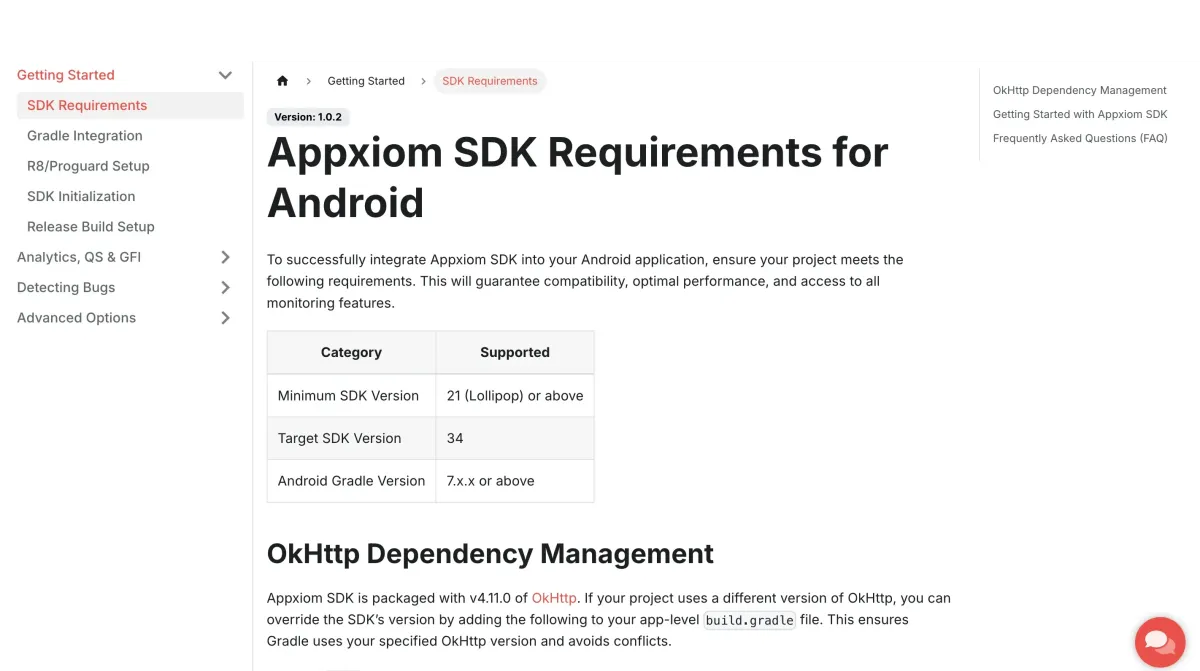
At Appxiom, we use Docusaurus to power our documentation. It's Markdown-based, version-friendly, and compiles into clean static HTML - making it easy to deploy and maintain.
If you're curious, you can explore our docs here: Appxiom Docs